Hermes Tasks
An Hermes Task is an object that can be created in a Python script to provide notifications (messages, images, plots) and track the execution of your script through waypoints.
The content of this page is just a quick reference to the usage of Hermes Tasks.
For more options or detailed information, I suggest to read the Task class documentation: hermes.task.task().
Additionally, I recommend to have a look at this Jupyter notebook for a complete and documented example of usage.
Creating a Task
from hermes.task import task as htask
ht = htask(alias = 'demo')
The alias argument is used to assign an explicit name to the task. It should be short and simple, because it is used to mark the messages that will be sent to the bot.
Note
By default, the messages will be sent to all the users specified in the Hermes configuration directory. To make the Task object send the messages to a specific user, or more user, check out this paragraph in the Advanced usage guide.
Sending messages and images
To send a message, use the method notify():
ht.notify('This is a demo of a task!')
To send an image, the method notify accepts as optional argument img the name of the image file to attach.
ht.notify(img = 'sample.jpg', txt = 'this text is attached to the picture')
Sending plots
To send a matplotlib plot, there are viable options:
Save the plot to a file and use the method
ht.notify(img = ...)to send the file.Pass the matplotlib figure object to the method
ht.plotify(fig, txt='...').
Have a look at this Jupyter notebook for an explicit example.
Use of waypoints
Waypoints are specific instructions in your code that will trigger the Hermes Task to send a message. Through waypoints, it is possible to track via messages the status of execution of your code.
## A long codeblock
...
...

ht.waypoint() # this is waypoint #1

## another long codeblock
...
...

ht.waypoint() # this is waypoint #2
The above code will send two messages:
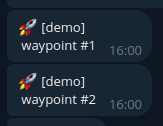
The waypoints are numerated starting from 1. The counter of waypoints can be reset via the method ht.waypoint_reset_counter() method.
Using the optional flag timed, ht.waypoint(timed=True), the message of the waypoint will include the time interval since the last waypoint.
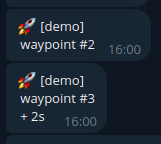
Closing a Task
The task can be marked as closed at the end of the script.
ht.close()
The user will be notified via the Telegram bot that the task has been closed.
After the execution of the close() method, it is no longer possible to send messages or create waypoints.
A task can be closed with a failure flag, using the optional argument fail:
ht.close(fail = 'this message is attached to the message of failure')
A task closed with the fail flag will be notified to the user with a different message (provided in the optional variable).