Hermes CLI
The CLI of Hermes is accessible via the hermes command:
hermes --about
In the following guide, I wish to quickly show the main features that are available via CLI.
Sending messages
Literally, how to send messages via the cli interface! The users that will receive the message are all the users specified in the Hermes configuration files. If more users are defined in the configuration files, it is possible to direct the message to a specific user (look at this section in the Advanced usage documentation).
Send a text
hermes -m 'Message to be sent'
Send an image or a file
Use the flags -i (-f), or explicitly --image (--file), to attach an image (file).
hermes -m 'Message to be sent' -i picture.png
hermes -m 'Message to be sent' -f attachment.pdf
Integrate Hermes with sh scripts
It is possible to invoke Hermes inside shell scripts. For instance, let’s look at the example examples/cli_demo.sh in the GitHub repository.
#!/bin/bash

hermes -m 'spawning my shell script'

...

hermes -m 'the script execution is completed'
Run a command
It is possible to execute a script/command under Hermes supervision. When the execution of the script/command is completed, Hermes will notify the user via message.
hermes --exe YOURSCRIPT.sh
It is possible to attach a message with the completion message:
hermes -m 'important scientific task' --exe YOURSCRIPT.sh
If the process exit code is not zero, Hermes notifies the error status and the stderr buffer.
The -b flag puts the execution of the script/command in background.
hermes -b -e YOURSCRIPT.sh
Hooking function
Hermes provides a way to extract text from stdout of the process and send it to the user at the end of the command execution. I show an example using the script examples/hook.sh in the GitHub repository.
hermes -e examples/hook.sh
Let’s have a look at the bash script:
...
echo "%HERMES% Hooked text number one"
echo "this text is not hooked"
echo "%HERMES% Hooked text number two"
...
The lines beginning with the text %HERMES% are hooked from the stdout buffer and sent from Hermes to the user.
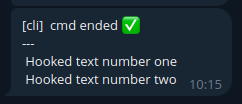
It is possible to customize the hook flag %HERMES% with the option --hook YOURHOOKFLAG.
Run the Hermes bot server
The Hermes Bot functionalities require a process that executes the infinity_polling method of the Telegram Bot API. To execute the bot server, use the command:
hermes --server
Note
If you wish to execute the server in background, have a look at the systemd setup procedure.
Diagnostics and troubleshooting
Verbose mode
The Hermes CLI can be invoked with a high verbosity mode to retrieve more information about possible sources of errors.
hermes --verbose
Dry run
A dry run might help to identify problems that occur in the setup of the Bot object. All the steps of the initialization are completed, but the Bot server is not started.
hermes --verbose --dry-run
Show a list of available users
To list the available users:
hermes --list-users
Check the installation status
This command prints the installation path of the Hermes library and the environment variable that (hopefully) points to your Hermes configuration directory.
hermes --check